PhemosReach / Content workflow guides
A social media approval workflow for small teams
By PhemosReach, a Modus Future product · Published · Updated
A useful approval workflow answers four questions: what are we saying, is it supported, where will it appear, and who checks delivery? Give the message and the finished post separate reviews so a good draft does not hide a wrong account or a broken link.
This guide covers the brief, the two reviews, a worked example, a handoff template you can copy or download, delivery checks, turnaround times, and what to do when something goes wrong anyway.
Who does what, by team size
An approval workflow is a set of roles, not a number of people. There are three: the draft owner, who writes the post and gathers the source; the reviewer, who checks the message and the finished post; and the publishing owner, who confirms it went out correctly.
- One person. You hold all three roles, so separate them in time instead. Write in one session, review the message at the end of that session, and review the finished post in a later one. A gap of a few hours makes your own mistakes much easier to see.
- Two people. One drafts, the other reviews both stages. Swap roles each week if you can, so both of you know what a good handoff looks like from the other side.
- Three to five people. Give the finished-post review to someone other than the message reviewer. The message reviewer knows what the post is meant to say, which makes it easy to read past what it actually says.
Whoever publishes owns the delivery check. If nobody is named for it, nobody does it.
1. Give the draft a clear brief
Choose one reader, one useful point and one next step. Attach the source behind any factual claim. Name a draft owner and a reviewer; in a one-person business, use two separate passes instead of assuming a second person is available.
2. Review the message
- Check names, numbers, dates and product claims against the source.
- Remove promises you cannot demonstrate. A planned feature is not an available feature.
- Read the draft aloud against your brand's writing samples.
- Make the call to action match the destination page.
3. Review the finished post
Inspect the actual caption and media together. Check mobile readability, image crop, captions where applicable, and whether the post still makes sense before a reader expands it. Confirm the exact brand account, timezone and scheduled date. An approved message is not proof of a correct publishing destination.
Where approved posts still go wrong
These are the failures a message review cannot see. Check each one in the finished-post review:
- The wrong account. A business page and a personal profile, or two brands under one login, look identical in a scheduler. Read the account name, not the avatar.
- The wrong timezone. A post scheduled for 9am in the scheduler's zone can land at 9am somewhere else. Confirm the zone on the post, not just the time.
- A link that has changed. A page moved, a campaign parameter was dropped, or the link now needs a sign-in. Click it from the finished post.
- An image crop. Each platform crops differently in the feed. Check the preview, especially for text inside the image.
- The first line. Many platforms cut the caption after a line or two. If the point is in the third sentence, most readers never see it.
- A stale claim. A price, a date or a feature that was true when drafted and is not true on the publish date. Check the date the source was last confirmed.
A worked example: catch a claim and a destination error
Illustrative draft: “Our tool guarantees your posts go live at the perfect time on every network. Start your free trial.” The evidence only shows scheduling through connected accounts, and the link opens a product walkthrough.
Revised: “Plan your next post, check its message and choose a connected publishing destination. See how the workflow fits together.” The review removes an unsupported guarantee and makes the call to action match the link. Before scheduling, the reviewer also checks that the selected Page belongs to the product rather than the parent company.
Copy this handoff template
Post title:
Intended reader and useful point:
Draft owner / reviewer:
Claim sources and date checked:
Approved caption and media version:
Destination account and platform:
Link and campaign parameters:
Publish date, time and timezone:
Message review complete:
Finished-post review complete:
Delivery URL or failure note:
Download the handoff template as a text file. Keep one copy per post, or paste the fields into whatever tracker you already use.
4. Verify delivery before retrying
A scheduled entry is a plan; a published post is the outcome. After the due time, check the publishing result and the destination. If a timeout leaves the result uncertain, check for an existing post before trying again. Record the public URL or the reason for failure so someone can act without creating a duplicate.
Set a turnaround you can keep
An approval step that takes three days turns a timely post into a stale one, and people start working around it. Pick a turnaround and write it down: the same working day suits most small teams.
Review in one batch at a fixed time rather than as each draft arrives. A batch keeps the standard consistent, because you compare posts against each other, and it keeps the review from becoming a stream of interruptions. Flag anything genuinely urgent in the handoff note so it goes first.
Name a backup reviewer for leave and busy weeks. Without one, posts either wait until the reviewer is back or go out unchecked, and both habits are hard to undo. In a one-person business, the backup is a rule instead: if you cannot do the second pass, the post waits a day.
Decide which posts can take a lighter check
Not every post carries the same risk. A weekly reminder that reuses approved wording is not the same as a launch announcement with a price in it.
Once a format has gone out cleanly several times, move it to a lighter check: a single read of the finished post before it publishes. Keep the full two-stage review for anything with a new claim, a number, a price, a named person or a new destination account. Write the rule down so nobody has to decide it again for every post.
Keep a record of what was approved
An approval you cannot look up later is only half done. For each post, keep the approved caption, the media version, who approved it and when, and the public URL once it is live. The handoff template above already has a line for each.
The record earns its keep in three situations. When a reader questions a claim, you can show the source and the date it was checked. When a post underperforms, you can compare it with the version that was approved rather than guessing what went out. And when someone new joins, a month of records teaches them your standard faster than any style guide.
Keep it somewhere boring and searchable: a shared folder, a spreadsheet, or the tool you already schedule from. The format matters less than the habit of filling it in before the post goes live, not after.
When a wrong post goes live anyway
Decide first whether it needs a correction or removal. A typo can usually stay, edited where the platform allows it. A wrong price, a wrong claim or a post on the wrong account should come down, followed by a corrected version if the message still matters.
Then fix the process, not just the post. Record what happened in the handoff note, find the check that would have caught it, and add that line to your checklist. A workflow improves by the mistakes it absorbs.
Applying this in PhemosReach
PhemosReach's default workflow separates script review from final review: the post text is approved first, then the image, then the finished post. Review settings and available connections affect the route a post takes. Confirm those settings and the selected account before approval. Start with one post and verify its complete journey before expanding the schedule.
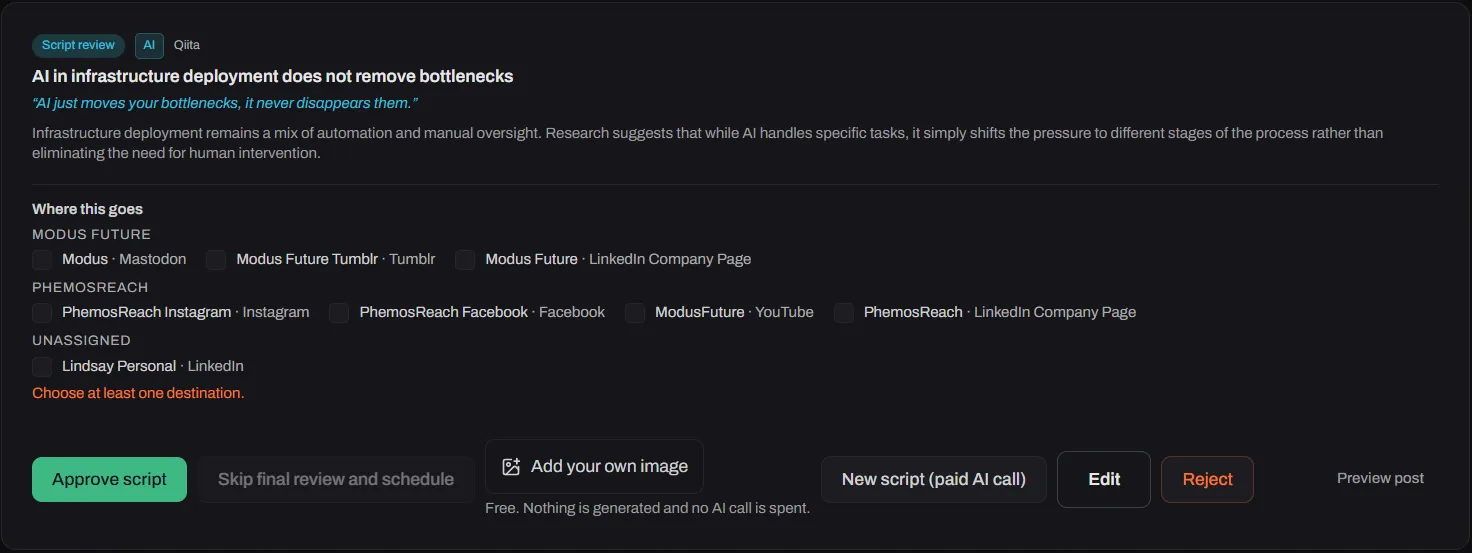
A post waiting at the script stage in the PhemosReach review queue. The destinations are chosen per post, and nothing is scheduled until the script is approved.
On the Business plan you can build your own multi-step approval workflows, with viewer, editor, reviewer, admin and owner roles, and give each brand its own route. For a brand that has earned it, auto-approve can be switched on for that brand alone. It needs an explicit opt-in and either a daily cap or a monthly budget, which is the lighter check from the section above with a limit attached.
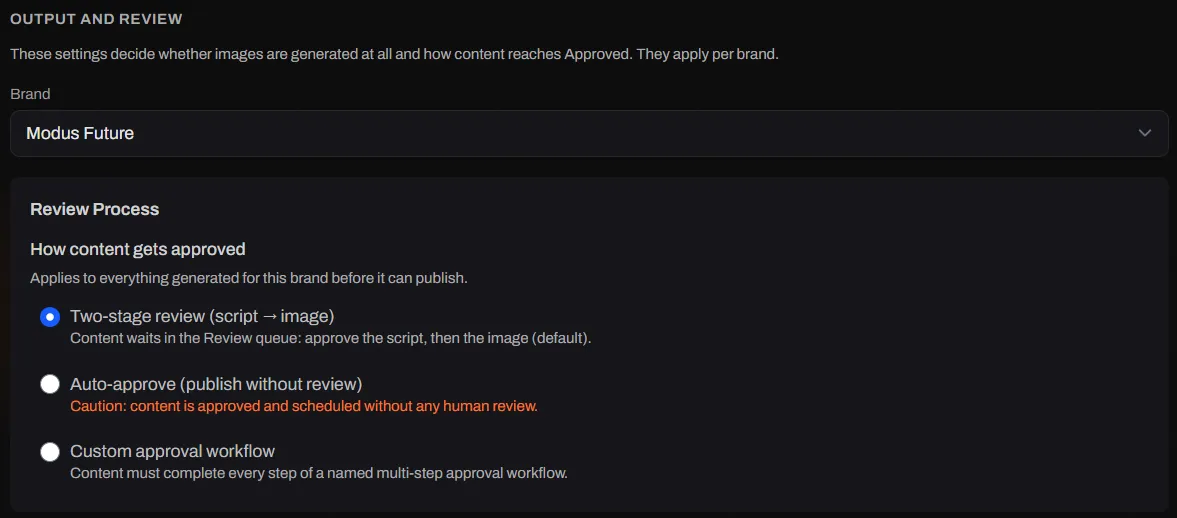
The review route is set per brand. Two-stage review is the default.
For the weekly routine around these checks, see content planning for small teams. To improve the draft itself, use the brand-voice exercise.
Questions
How many people do you need for a social media approval workflow?
One is enough, as long as the two reviews happen at different times. Review the message when you finish the draft, then review the finished post the next morning with fresh eyes.
With two people, one drafts and the other reviews both stages. With three to five, split the finished-post review from the message review so one person is not checking their own work.
How long should a social post approval take?
Set a turnaround you can keep, such as the same working day, and review in one batch rather than as each draft arrives. Batching keeps the check consistent and stops approval from becoming a stream of interruptions.
If a post is time-sensitive, say so in the handoff note so the reviewer can put it first.
Should every social post be approved?
Every post should pass a check. Not every post needs the full two-stage review. Routine posts that reuse approved wording, such as a weekly reminder, can move to a lighter check once the same format has gone out cleanly several times.
Keep the full review for anything with a new claim, a number, a price, a person's name or a new destination account.
What is the difference between reviewing the message and reviewing the finished post?
The message review asks whether the post is correct, supported and useful. The finished-post review asks whether that message will actually appear as intended on this platform, from this account, at this time, with this image and link.
A correct message can still go out on the wrong account, with a cropped image or a broken link, which is why the two are separate.
What should you do if a wrong post goes live?
Decide quickly whether it needs a correction or removal. A typo can usually stay with an edit where the platform allows it. A wrong price, a wrong claim or a post on the wrong account should come down, followed by a corrected version if it still matters.
Then record what happened in the handoff note and add the missed check to your checklist, so the same mistake is caught next time.
Related guides
- Make your brand voice usable. Choose writing samples, turn vague tone words into instructions and review an illustrative rewrite.
- Social media approval checklist. Twenty-four checks across four stages, a five-check short version for routine posts, and text and spreadsheet downloads.
- Schedule LinkedIn posts with an approval step. LinkedIn's own limits, a six-step routine from brief to published post, and the checks that catch the wrong page or the wrong audience.
- Schedule Instagram posts with an approval step. The limits scheduling tools work within, a six-step routine from brief to published post, and the checks that catch a bad crop or a missing image.